





How to Choose the Right TV Stand Size
A TV stand helps establish the balance of your living room. A unit that is too large can crowd the space, while a small one may look lost beneath a large screen. Consider the television, viewing distance, stand height and room dimensions together.
1. Start with the Television’s Actual Width
TV sizes such as 43, 55 or 65 inches describe the diagonal screen measurement, not the width. A standard 16:9 65-inch screen is approximately 144 cm wide.
Approximate screen widths and suggested stand widths
- 43-inch TV: 95 cm screen; consider a 120–150 cm stand.
- 50-inch TV: 111 cm screen; consider a 140–170 cm stand.
- 55-inch TV: 122 cm screen; consider a 160–180 cm stand.
- 65-inch TV: 144 cm screen; consider a 180–220 cm stand.
- 75-inch TV: 166 cm screen; consider a 200–240 cm stand.
- 85-inch TV: 188 cm screen; consider a 220–260 cm stand.
Screen widths are approximate. Actual dimensions, including the frame and feet, vary by model. Suggested stand widths are visual guidelines, not technical requirements. Leaving space on each side generally creates a balanced appearance. A 220 cm stand beneath a 144 cm-wide screen leaves approximately 38 cm at each side.
2. How Much Wider Should the Stand Be?
There is no single rule, but a stand wider than the screen often looks balanced. Consider 180 cm beneath a 55-inch screen, 200 or 220 cm beneath a 65-inch screen, and 220 or 240 cm beneath a 75-inch screen.
If the TV is wall-mounted, a slim console or solid wood shelf can provide a simple, uncluttered line below it.
3. How High Should a TV Stand Be?
A useful starting point is to position the center of the screen near your seated eye level. Account for your sofa, sitting position, screen size and TV feet as well as the stand itself. Units around 30–40 cm high can suit low, modern seating; 40–50 cm may work with many standard arrangements. With a wall-mounted TV, the stand height can be chosen more independently, while the screen still needs a comfortable viewing height.
4. Choosing a TV Stand for a Small Living Room
Prioritize shallow, slim or wall-mounted designs. Avoid allocating space to storage you will not use, and consider the wall width alongside the TV. For example, a simple 180 or 200 cm stand may look balanced against a 250 cm wall. Light wood and slim metal legs can reduce visual weight.
5. Are Longer Stands Better in Large Rooms?
Stands measuring 220, 240 or 260 cm may balance large TV walls and 65-, 75- or 85-inch screens. A large room does not necessarily need a bulky cabinet: a 240 cm-long solid wood shelf only 20 cm high can create a strong composition. Proportion matters more than bulk.
6. How Deep Should a TV Stand Be?
- Minimal wall shelf: approximately 20–30 cm.
- Slim TV console: approximately 30–35 cm.
- Standard TV stand: approximately 35–45 cm.
- Larger storage cabinet: approximately 40–50 cm.
If the TV rests on the unit, check the depth and position of its feet. Wall-mounted screens may allow shallower designs. Measure games consoles, receivers and audio equipment, including cable space and required ventilation. Even 10 cm can make a difference in a narrow walkway.
7. How Far Should the Sofa Be from the TV?
Viewing comfort depends on screen size, resolution, content and personal preference. Approximate ranges for 4K televisions are:
- 43 inches: 1.3–1.8 m.
- 50 inches: 1.5–2.1 m.
- 55 inches: 1.7–2.3 m.
- 65 inches: 2.0–2.7 m.
- 75 inches: 2.3–3.1 m.
- 85 inches: 2.6–3.5 m.
These are approximate comfort ranges, affected by viewing angle, picture quality and preference. At a viewing distance of 2.5 m, a 55- or 65-inch TV may be worth considering. Plan the stand around the room’s overall proportions too.
8. Why Choose a Solid Wood TV Stand?
A well-chosen stand can remain useful as televisions change. Natural grain gives every piece its own character, while solid wood can suit different decorating styles over time.
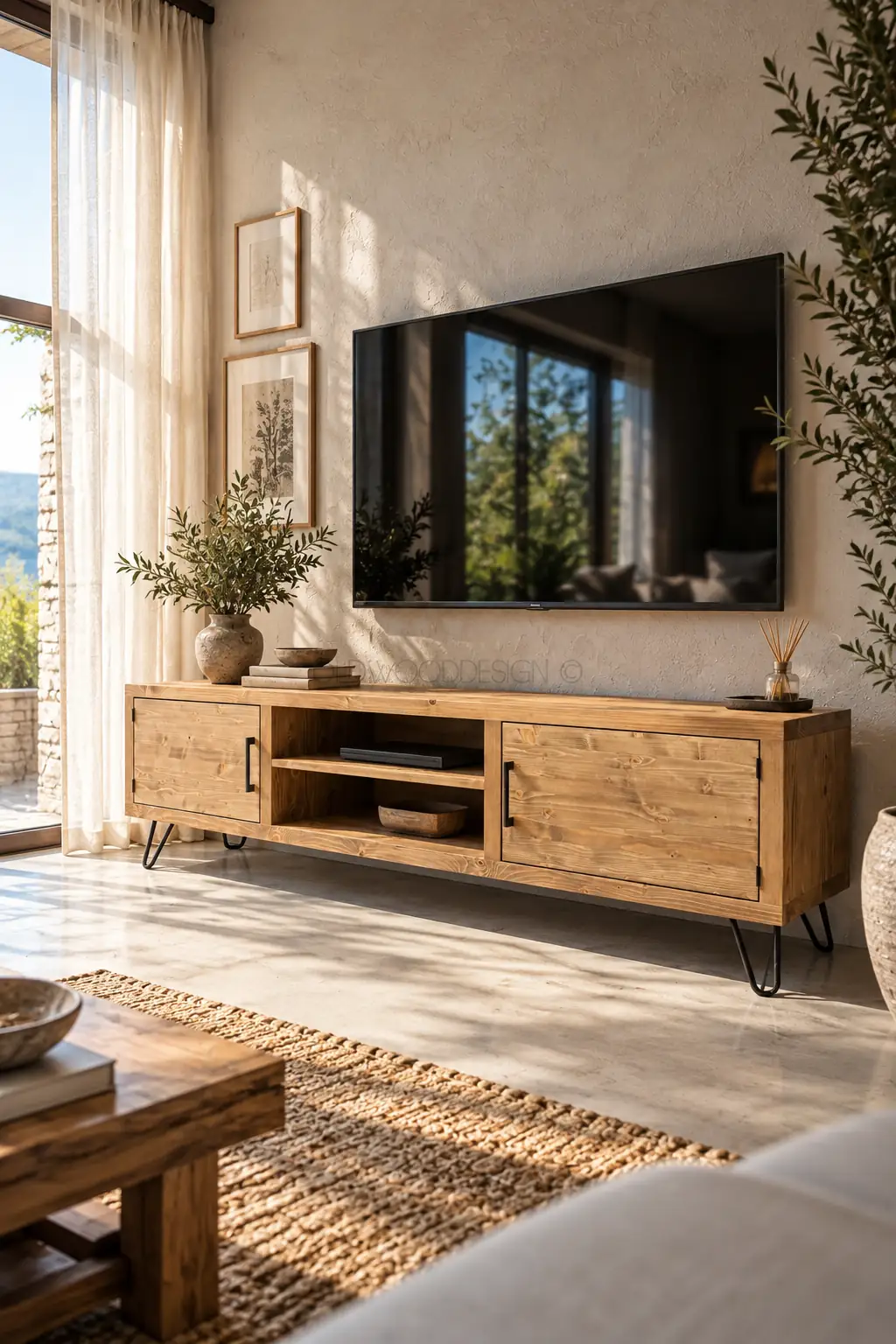
Solid wood and metal
Slim metal details work well in modern or industrial interiors. Black metal legs can complement the warmth of wood.
Wall-mounted solid wood shelves
Wall shelves create a minimal line beneath the screen and keep more floor space clear. Check the wall’s load-bearing capacity and use appropriate fixings.
9. Five Common Mistakes
- Choosing by diagonal screen size without measuring the TV’s actual width.
- Ignoring the dimensions of the living room.
- Placing the screen too high for comfortable viewing.
- Forgetting cables, routers, consoles and sound equipment.
- Planning only for the current TV when an upgrade is likely.
10. Should You Consider Custom Dimensions?
Windows, doors, columns and wall widths can make standard sizes unsuitable. If 180 cm is too short and 220 cm too long, a custom 200 cm unit may fit better. OWD offers simple, functional solid wood designs for different spaces and size requirements.
Finding the Right Balance
Suggested starting widths are 160–180 cm for a 55-inch TV, 180–220 cm for a 65-inch TV and 200–240 cm for a 75-inch TV. Also consider room width, viewing height, storage and your decorating style. Explore OWD’s solid wood TV stands to find a model suited to your home.
From Measurements to Models
Measure the TV’s actual width and depth, including its feet, before comparing stands. The Bristol Solid Wood TV Stand, for example, offers widths of 150, 180 and 200 cm. Its description specifies a height of 45 cm and depth of 40 cm. Confirm the dimensions of your selected variant before ordering.
Is a 180 cm stand always sufficient for a 65-inch TV?
No. Check that the feet are fully supported on the top and that the stand’s load capacity is suitable. A width suggested for appearance is not a guarantee of technical compatibility. Follow the television manufacturer’s installation instructions.
What should you measure for consoles and audio equipment?
Include equipment width, height and depth, cable connectors and the manufacturer’s ventilation clearances. For a narrow wall or a particular equipment layout, share dimensions and photos with OWD for model and sizing advice. Consult our solid wood furniture care guide for everyday maintenance.

Lorem ipsum dolor sit amet, consectetur adipiscing elit. Suspendisse velit nisl, aliquam eget sodales in, scelerisque malesuada lorem. In nec pretium purus, eu accumsan ante.